Publish your first listing
Create the thing other people search, open and book — title, kind, description, price and at least one image.
A listing is the unit other people search, open and book. Until you have one, your workspace is not visible to anyone looking.
Open your workspace, go to its listings, and choose the button that adds one.
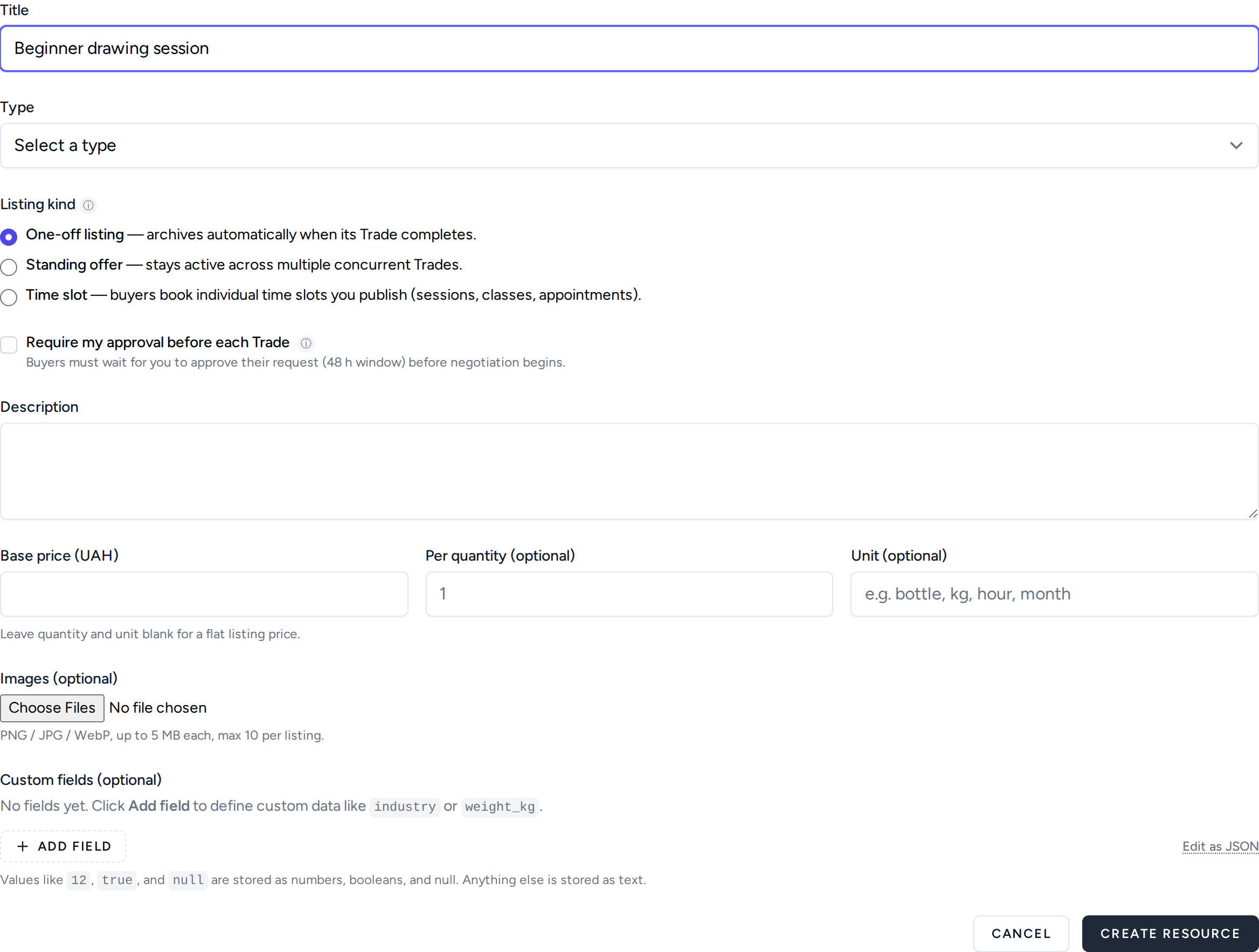
Listing kind — the one choice worth reading twice
This is the field people get wrong, because all three options look reasonable and they behave very differently after someone books.
- One-off listing — archives itself automatically once its trade completes. Right for a single item, or a service you are offering exactly once. Wrong for anything repeatable: you would have to re-create it every time.
- Standing offer — stays active across several concurrent trades. Right for something you can supply repeatedly and in parallel.
- Time slot — buyers book individual slots you publish. Right for sessions, classes and appointments, where the thing being sold is a specific hour rather than a quantity.
You can change your mind later, but not once bookings exist against it — so it is cheaper to think for a moment now.
Require my approval before each trade
Off by default, and off is usually right. Turned on, every request waits for you to accept it before anything else can happen, within a 48-hour window. That is worth it when you have to check whether you can actually take the work; it costs you bookings when you do not, because some buyers will not wait.
Title and description
Write what someone would type into a search box, not what you would put on a business card. The title carries most of the weight; the description is where you answer the question the title raises.
Both are searchable, so the words a buyer would use need to appear somewhere in them. Avoid opening with your own name — people search for what they want, not for you, until they already know you.
Price, quantity and unit
Base price is in your workspace's currency, shown in the field label so you cannot fill it in the wrong one by accident.
Leave quantity and unit blank for a flat price. Fill them in when the price is per something — per hour, per kg, per month — and the listing will show the unit alongside the number rather than making the buyer guess.
Images
Optional in the form, not optional in practice. Listings with an image are opened far more often, and some sharing destinations cannot post without one at all — a share to those simply fails rather than posting a text-only version.
PNG, JPG or WebP, up to 5 MB each and 10 per listing. The first one is the one that appears in search results and on social cards, so put your best one first.
When you are done
Your listing is live. The last step is checking what it actually looks like to someone who is not you.